
Handing over a paper card is obsolete, but the digital alternative often stalls at the exact moment of exchange: the physical scan. A professional holds their mobile device over a printed lanyard, the camera focuses on the matrix, and instead of a seamless prompt to save contact details, the browser opens a blank page or triggers a generic web search. The friction lies not in the printed matrix itself, but in the mobile operating system's interpretation of the embedded data string. When devices fail to process the handoff, the interaction halts. Understanding exactly how to use a qr code on your phone dictates whether that brief interaction results in a stored network connection or a permanently lost lead. The distinction between native camera scanning, third-party wallet integration, and offline context processing fundamentally changes the reliability of digital networking.
Quick Summary
Scanning a digital identity matrix translates a two-dimensional visual pattern into an actionable data payload, resulting either in a native system command or a network routing request. The reliability of this process depends directly on how the device's native hardware parses the underlying uniform resource identifier.
- Native mobile cameras interpret raw text files entirely differently than dynamic web addresses.
- Connection failures routinely stem from captive local networks intercepting the initial browser redirect.
- High-density static matrices require closer focal distances and perfect lighting, increasing scan failure rates.
- Consolidating professional presence into a centralized digital hub minimizes the risk of fragmented or outdated data routing.
Table of Contents
- Why mastering how to use a qr code on your phone dictates connection success
- Operating systems diverge on payload interpretation
- Where dynamic routing silently fails
- Evaluating static raw data against dynamic centralized hubs
- The physical constraints of matrix density limit scan distance
- Structuring the post-scan destination for immediate action
- Tracking acquisition metrics without compromising system privacy
- FAQ
- Recommended Reads
Why mastering how to use a qr code on your phone dictates connection success
A digital matrix does not actively transmit anything; it is a passive storage medium. When a device scans a pattern, the camera application reads the Reed-Solomon error-corrected modules and outputs a raw string of text. The success of the interaction relies entirely on the local operating system recognizing the format of that string and knowing which application should handle it.
If the extracted string begins with BEGIN:VCARD, the operating system attempts to map the subsequent text lines directly into its local contacts database. If the string begins with https://, the operating system pushes the payload to the default web browser. Users routinely assume the matrix itself is broken when, in reality, the device simply does not know how to route the decoded string. By identifying whether a pattern contains raw offline data or a network routing request, a practitioner can predict exactly how a target device will behave upon scanning. You can verify this mechanism directly today: point a generic plain-text scanner application at any contact matrix, read the raw string output, and note the protocol prefix that dictates the device's subsequent behavior.
Operating systems diverge on payload interpretation
The most significant barrier to reliable digital exchange is that iOS and Android handle identical data payloads using entirely different user interface protocols. When an iPhone running current iOS natively scans a raw vCard matrix, it parses the .vcf stream natively and immediately overlays a "New Contact" modal directly over the camera viewport. The user taps once to save the information, never leaving the camera application.
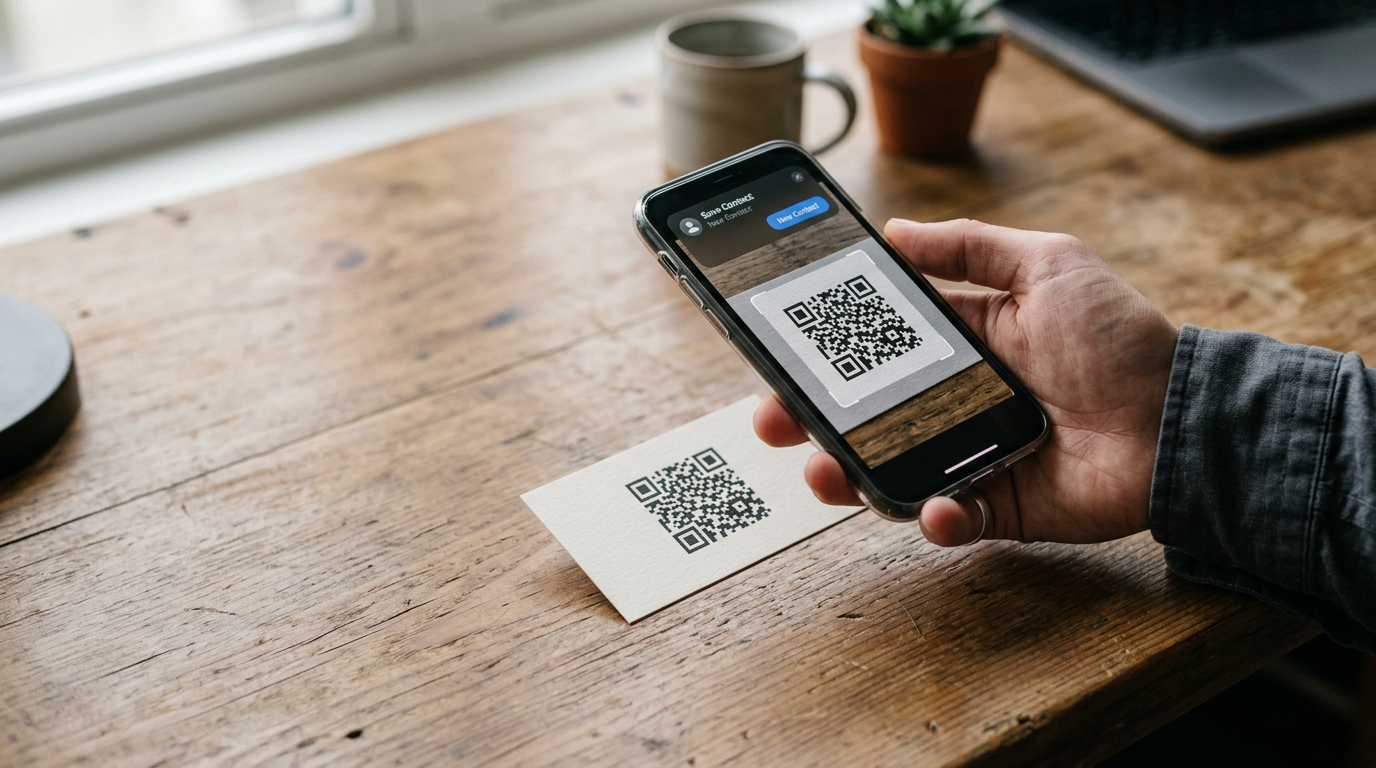
Android devices process the exact same vCard completely differently. Depending on the manufacturer overlay and the specific version of Google Lens or Chromium embedded in the system, Android will frequently download the .vcf file directly into the local storage folder without any user notification. The scanner is left staring at the active camera interface, completely unaware that the contact data has been successfully downloaded in the background. This silent download behavior breaks the momentum of a professional interaction, forcing the user to dig through their file manager to finalize the connection.
Standardizing your approach across varying hardware ecosystems requires accounting for these OS-level variations. Building profiles that gracefully handle both behaviors is detailed comprehensively in Everything You Need to Know About Digital Business Cards with QR Codes.
Where dynamic routing silently fails
When a matrix relies on a network URL rather than offline data, connection failures usually present as a generic blank screen. Treating this as a single problem leads to ineffective troubleshooting. There are four distinct infrastructure failures that look identical from the outside, requiring specific diagnostic checks.
First, captive portal interception occurs when the scanning device connects to a venue's guest Wi-Fi but has not cleared the terms of service. The HTTP request triggered by the scan is hijacked, loading a blank captive portal screen. Second, SSL certificate failure happens when the routing server's security protocol is misconfigured, causing the device to actively block the connection. Third, deprecated shortlink resolution occurs when the visual pattern points to a third-party redirection service whose domain registration has lapsed. Fourth, in-app browser isolation happens when a user scans the matrix using a social media application's built-in camera function. These sandboxed webviews deliberately block standard HTTP file downloads to prevent malware, rendering the final